
PHP2Shell is the name given to two critical flaws in PHP itself, tracked as CVE-2026-109618 and CVE-2026-109619. PHP fixed them on 21 October 2026. An attacker does not need a login: on an unpatched server, a crafted web request can let them run their own code and take over the website. WordPress, WooCommerce, Joomla, Drupal, Magento and custom PHP sites are all exposed if the PHP underneath is not patched.
Attacks started before the fix was even public, and the US cybersecurity agency CISA added both flaws to its list of actively exploited vulnerabilities on 26 October. This guide explains what PHP2Shell is in plain language, how to check whether your site is patched, and exactly how to fix it on Hostinger, GoDaddy, Namecheap, other cPanel and Plesk hosts, VPS and dedicated servers.
Not sure where to start? Email info@digitalmarketingcube.com with your domain and host, and our team will check it with you.
What is PHP2Shell?
PHP2Shell is a pair of memory-handling bugs in the core of PHP, the language that runs most of the web. Both carry a severity score of 9.2 out of 10 (CVSS v4.0), and the faulty code has been in PHP since version 5.4, released in 2012.
- CVE-2026-109618: when a request pushes PHP to its memory limit while it is still reading that request, PHP can carry on with half-prepared data. This happens before your website’s own code even runs, so a plain “Hello World” page on an affected version is enough. Researchers showed it can also leak pieces of server memory.
- CVE-2026-109619: after certain errors, PHP keeps pointing at memory it has already let go of, and the next request handled by the same PHP worker can reuse it. That is the second route to running attacker code.
Every known trigger uses an ordinary multipart/form-data request, the same type browsers use to submit forms and upload files. It affects the common ways PHP runs on a server: PHP-FPM, Apache’s mod_php, CGI, LiteSpeed and FrankenPHP. Apache with mod_php is considered the highest risk.
The flaws were found by several security teams, including Calif, Wiz and OpenAI, using AI-assisted code review. Details leaked a day early, so PHP moved its release forward to 21 October 2026 at 14:00 UTC.
Which PHP versions are affected and fixed?
Find your PHP branch below. If your version is lower than the safe version, update now.
Patched builds for PHP 8.1, 8.0 and 7.4 come from Ubuntu, Debian, Red Hat, AlmaLinux, Remi, CloudLinux, cPanel and TuxCare.
Known side effect in 8.4.27 and 8.5.12. A separate change in these releases can crash PHP in some applications that use SimpleXML (php-src issue #24488). A fix has been merged into PHP’s source, but at the time of writing no follow-up release had shipped. Do not roll back to an unpatched version because of this. Watch your error logs after updating, and apply the next point release as soon as it is out.
How attacks have unfolded so far
- 17 October 2026: Amazon’s honeypots recorded an exploit attempt, four days before the public release.
- 20 October: the CVE numbers and a proof-of-concept video leaked online.
- 21 October: Cloudflare reported attacks from early morning UTC and pushed emergency firewall rules. PHP released the fixes at 14:00 UTC.
- 24 October: a researcher confirmed successful takeovers of test servers running PHP 8.4.26 with mod_php.
- 26 October: CISA added both CVEs to its Known Exploited Vulnerabilities catalogue. Researchers reported working exploits against unpatched PHP 8.2 to 8.5.
On 23 October PHP also published an informational advisory, CVE-2026-115560, about a less likely attack path in session handling. It only applies when a site changes its session format at runtime while upload progress is enabled. No attacks had been reported at the time of writing.
Step 1: Find the PHP version your website really uses
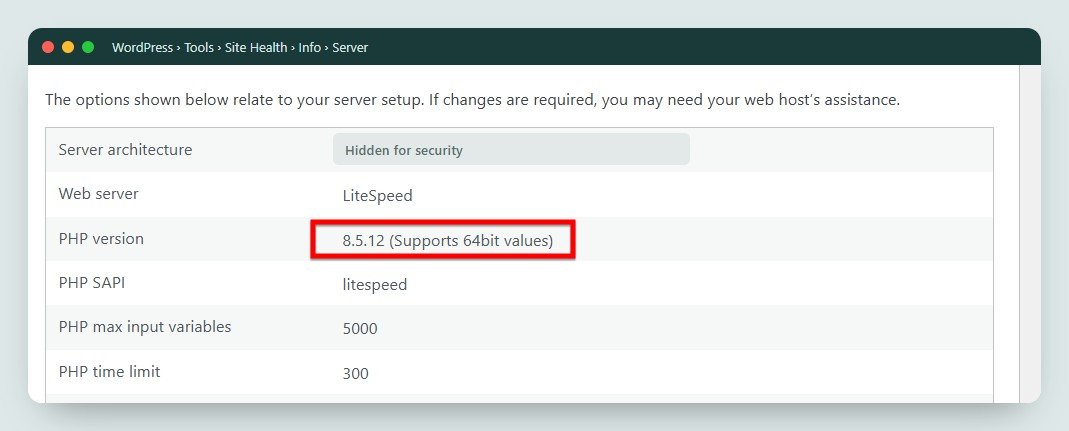
The PHP your website runs on can differ from the PHP you see in a terminal, and many sites run a different version per domain. Check the version that serves your website:
- WordPress: go to Tools › Site Health › Info › Server. It shows the PHP version.
- Hosting panel: look for “PHP Info”, “PHP Configuration”, “MultiPHP Manager” or “Select PHP Version”. The exact names for each host are below.
- Any site: create a file called
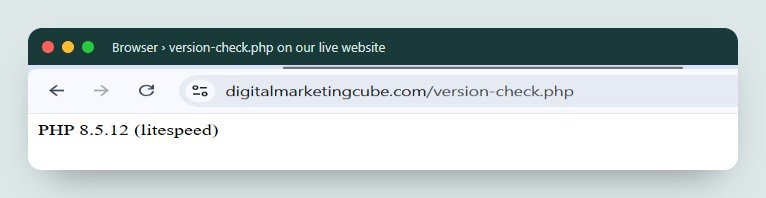
version-check.phpin your website’s root folder with the code below, open it in your browser, note the result, and delete the file straight away.
<?php
echo 'PHP ' . PHP_VERSION . ' (' . PHP_SAPI . ')';
Uploaded to a live website, the page shows a single line such as PHP 8.5.12 (litespeed) or PHP 8.3.36 (fpm-fcgi): the version number, then the way PHP runs on that server.
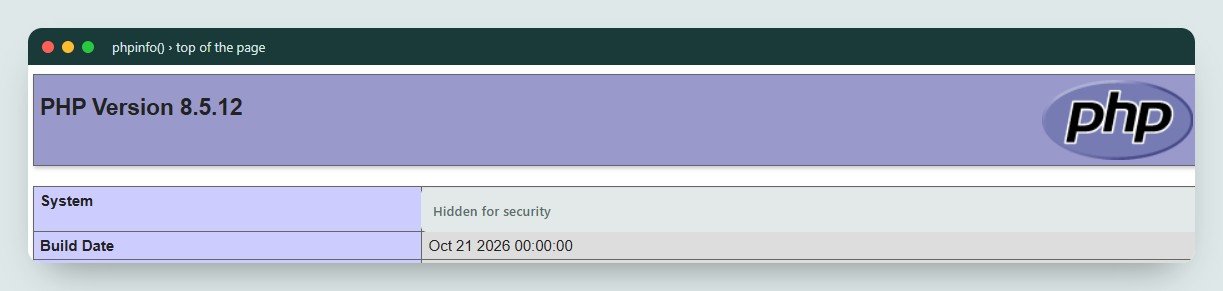
For the build date as well, use <?php phpinfo(); instead. The “Build Date” near the top tells you when your host compiled PHP. A build dated 21 October 2026 or later usually means the patch is in. Delete this file too, because it reveals a lot about your server.
Quick check from outside: the X-Powered-By header
Many servers announce their PHP version in a response header called X-Powered-By. You can see it in Chrome (right-click › Inspect › Network › reload › click the first request › Response Headers) or from a terminal with curl -I https://yourdomain.com/. Here is our own site, hosted on Hostinger, after the patch:
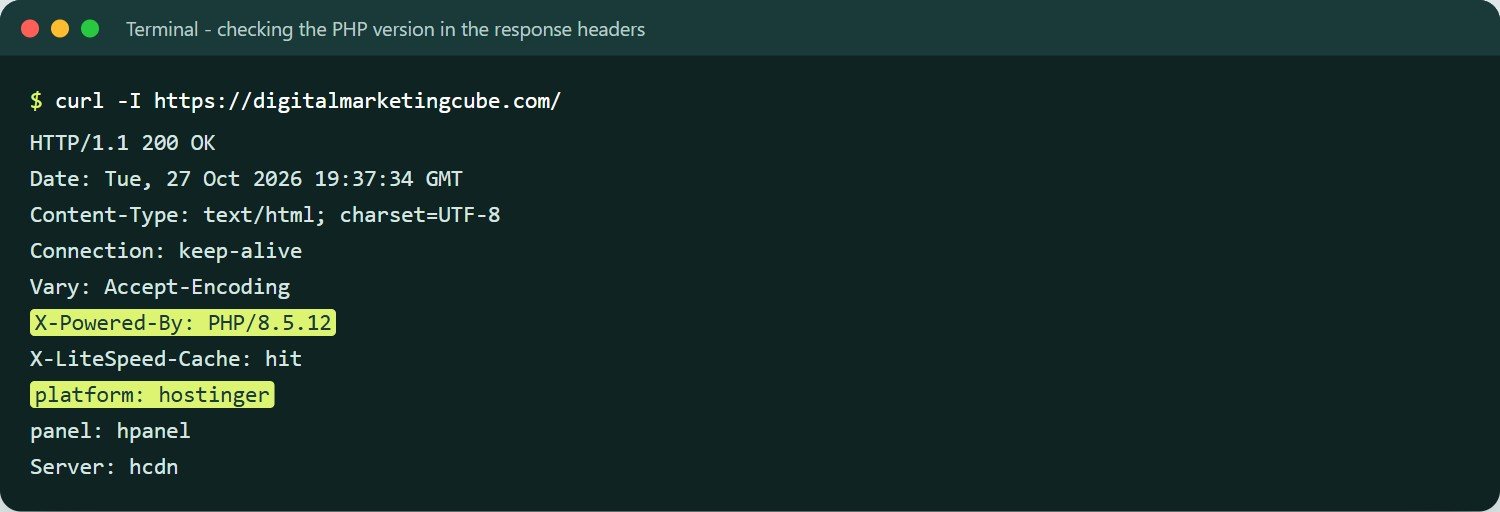
Many hosts and security plugins hide this header, which is good practice. If you do not see it, use one of the checks above instead.
Why the version number alone can mislead you. Ubuntu, Red Hat, AlmaLinux, CloudLinux, cPanel and many hosts fix security holes by backporting: they patch the code but keep the old version number. A site can show PHP 8.1.2 or 8.4.26 and still be fully patched. The reverse is also possible: a host may have installed the fix but not yet restarted PHP, so the old code is still running. If the version is below the fixed numbers above, check the build date or ask your host to confirm.
Step 2: Fix it on shared hosting
On shared hosting you cannot update PHP yourself. Your host maintains PHP on the server. What you can do is check that they have patched it, make sure your site uses a supported PHP version, and switch if it does not.
Hostinger
Hostinger posted an official status update. It said its platform was not vulnerable but applied the fix anyway, and finished on all managed hosting by 22 October 2026. Its cPanel servers moved to the latest Alt-PHP builds.
- In hPanel, open Websites › Dashboard › PHP Info.
- Check the Build Date. It should be 21 October 2026 or later. The version number may not have changed, for example it can still read 8.5.11. That is expected.
- If your site still runs PHP 7.4 or older, change it under Advanced › PHP Configuration to 8.3 or 8.4 after testing (see “Before you switch PHP versions” below).
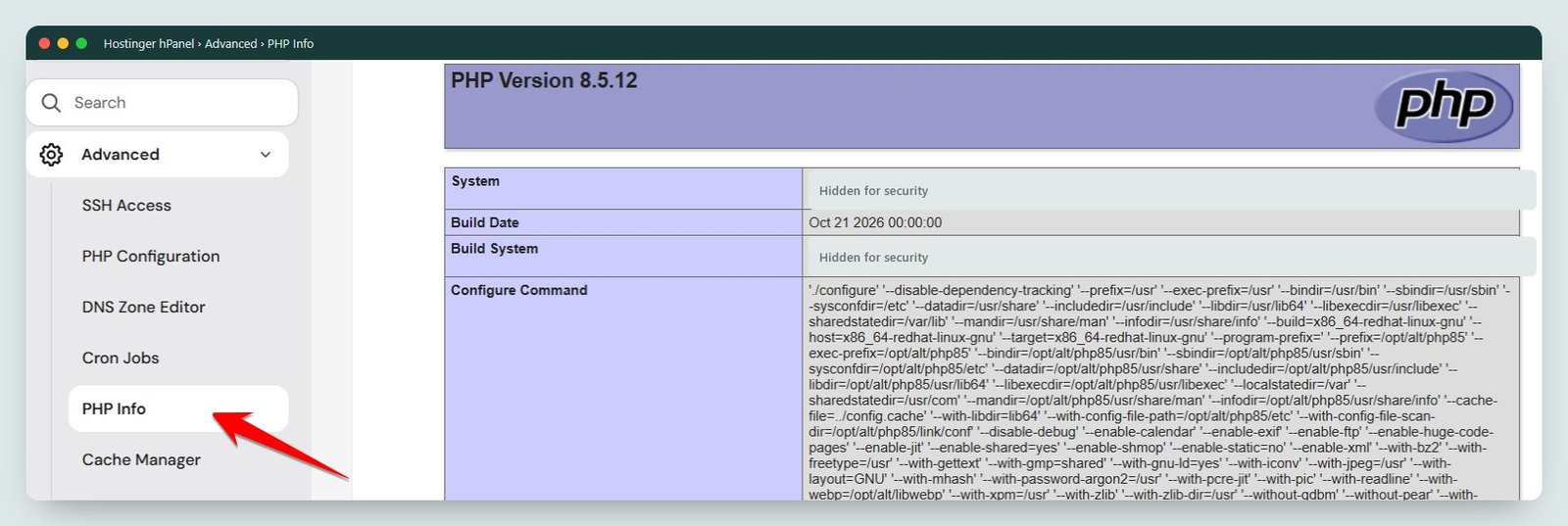
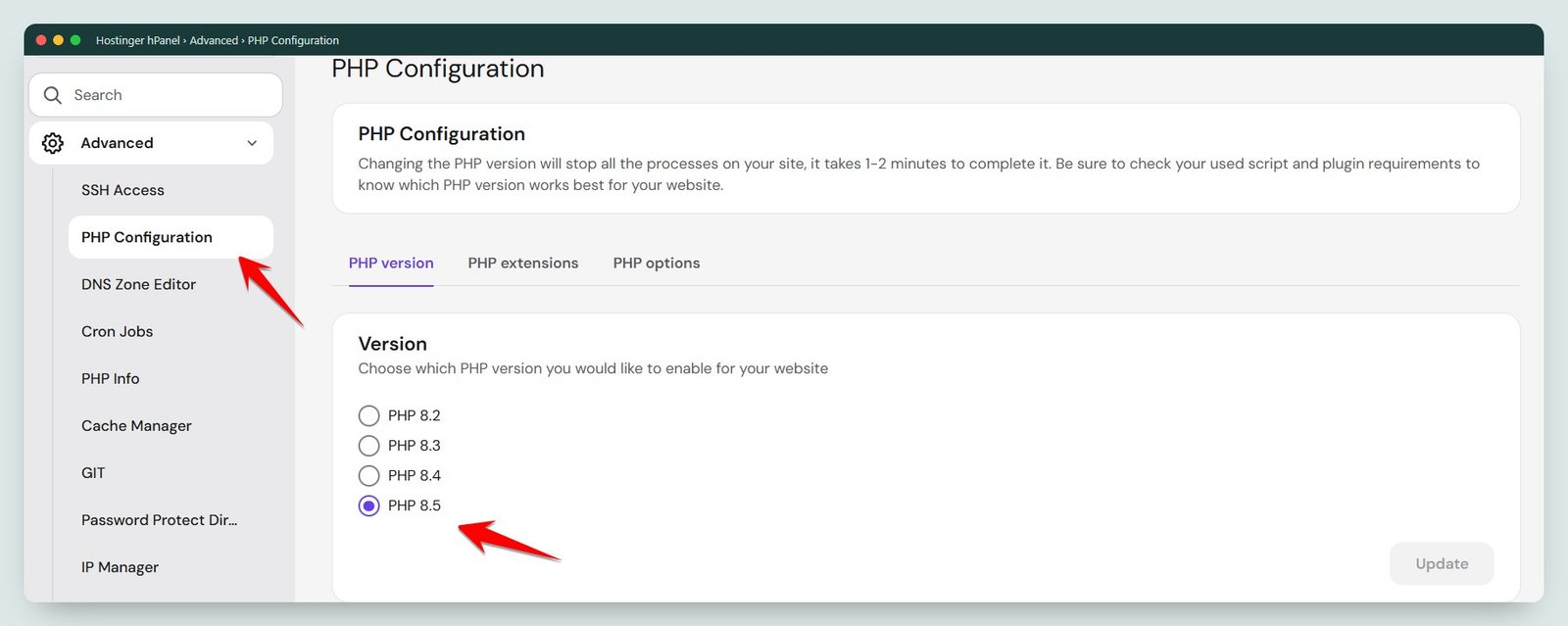
Web, Cloud, Agency and cPanel plans need no further action. Hostinger VPS customers must patch the server themselves (Step 3).
GoDaddy
GoDaddy has reportedly patched Managed WordPress on 21 October and its cPanel, Windows and Web Hosting plans on 22 October. We could not find this on an official GoDaddy page, so confirm with GoDaddy support. GoDaddy VPS and dedicated servers are the customer’s responsibility.
- For cPanel hosting, go to My Products › Web Hosting › Manage › cPanel Admin.
- Open Select PHP Version or MultiPHP Manager and check the version for each domain. Move anything on 7.4 or older to a supported version.
- Check the build date with the
phpinfo()file from Step 1, or ask support to confirm that your server has the PHP2Shell patch.
Namecheap
At the time of writing we found no public PHP2Shell statement from Namecheap. Its shared plans use cPanel with CloudLinux, and CloudLinux shipped patched alt-php and ea-php packages for all versions from PHP 5.2 to 8.5, so a patched build is available to Namecheap’s servers.
- Log in to cPanel and open Select PHP Version (or MultiPHP Manager).
- Note the current version for each site and move anything below PHP 8.2 to 8.3 or 8.4 after testing.
- Check the build date with
phpinfo(), then open a support chat and ask: “Has the PHP2Shell patch (CVE-2026-109618 and CVE-2026-109619) been applied to my server, and have PHP processes been restarted?”
Other cPanel hosts (Bluehost, HostGator, A2, MilesWeb, BigRock and similar)
cPanel released patched EasyApache 4 PHP packages on 21 October for PHP 8.2 to 8.5, with backported fixes for 7.4, 8.0 and 8.1. CloudLinux did the same for its alt-php packages. Your host still has to install them and restart PHP. SiteGround has reportedly applied the fix on all its servers, and hosting.com (formerly A2 Hosting) says it applied the backports. For any cPanel host:
- Open MultiPHP Manager or Select PHP Version in cPanel and note each site’s version.
- Check the build date with
phpinfo(). - If the build date is older than 21 October 2026, or you are unsure, ask your host to confirm the patch and the PHP restart.
Plesk hosting
Plesk ships patched PHP 8.2.35, 8.3.36, 8.4.27 and 8.5.12 for Plesk on Linux. On a hosted Plesk plan, go to Websites & Domains › your domain › PHP (or PHP Settings) to see and change the version. If you run your own Plesk server, see the Plesk steps under Step 3.
Managed WordPress hosts (Cloudways, Kinsta, WP Engine and others)
We found no public PHP2Shell statements from these hosts by 28 October. Managed hosts control PHP for you, so check the PHP version in your dashboard and ask support to confirm the patch. On Cloudways, you manage the server: confirm under Server › Settings & Packages and ask support whether the patched build is installed.
Before you switch PHP versions. Moving from PHP 7.4 to 8.x can break old themes and plugins. Take a full backup first, update WordPress, your theme and every plugin, then switch on a staging copy if your host offers one. Check the home page, forms, checkout and admin after switching. If something breaks, switch back to the previous supported version while you fix it. Never go back to an unpatched build.
Step 3: Fix it on a VPS or dedicated server
On a VPS or dedicated server, including Hostinger VPS, GoDaddy VPS, DigitalOcean, AWS Lightsail and Linode, you are responsible for PHP. Updating takes a few minutes. Always finish with a restart: installing new packages does not change PHP processes that are already running.
Ubuntu
Ubuntu published USN-8948-1 on 21 October. Ubuntu backports, so the version number stays the same. Patched packages include php8.1 8.1.2-1ubuntu2.28 on Ubuntu 22.04 and php8.3 8.3.6-0ubuntu0.24.04.13 on Ubuntu 24.04.
sudo apt update
sudo apt upgrade
# list installed PHP packages and their versions
dpkg -l | grep php
# confirm the fix is in (change 8.3 to your version)
zgrep CVE-2026-109618 /usr/share/doc/php8.3-common/changelog.Debian.gz
If you installed PHP from a third-party repository such as the ondrej/php PPA, apt upgrade pulls from there instead. Make sure it brings you to 8.2.35, 8.3.36, 8.4.27 or 8.5.12 or newer with php -v.
Debian
Debian’s patched packages change the version number, so php -v is reliable here. Reported fixed versions are PHP 8.2 8.2.35-1~deb12u1 on Debian 12 and PHP 8.4 8.4.27-1~deb13u1 on Debian 13. Confirm on the Debian security tracker.
sudo apt update
sudo apt upgrade
php -v
The first line of the output shows the version and the build date:
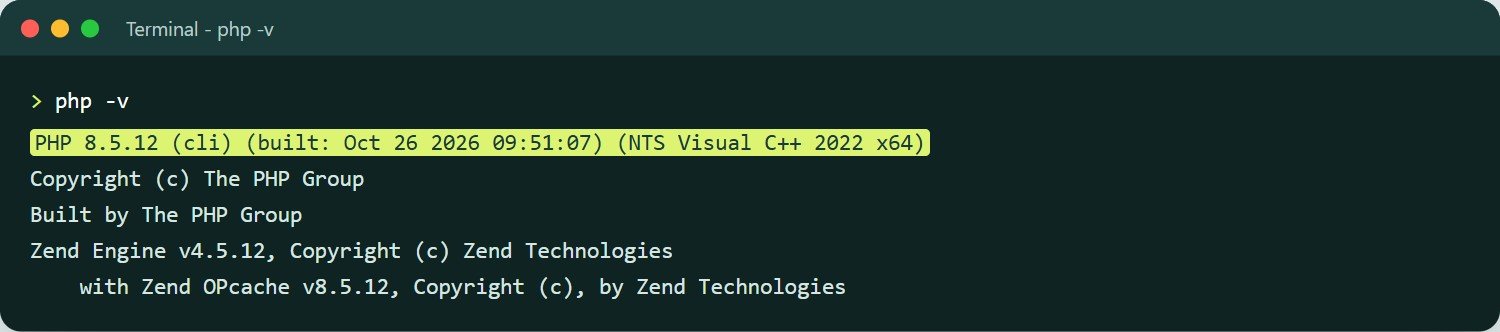
php -v on a patched PHP 8.5.12 build. On a server, also check the PHP that serves your website, because it can differ from the command-line PHP.AlmaLinux, Rocky Linux and RHEL
Red Hat-based systems also backport, so check the package changelog rather than the version number. AlmaLinux shipped its own backports for PHP 8.0 and 8.1. The Remi repository ships 8.2.35 to 8.5.12 plus patched 7.4, 8.0 and 8.1 builds.
sudo dnf upgrade 'php*'
# confirm the fix is in
rpm -q --changelog php-common | grep CVE-2026-109618
Restart PHP so the patch takes effect
Restart whichever of these you use. Change the version number to match your server.
# PHP-FPM on Ubuntu / Debian
sudo systemctl restart php8.3-fpm
# PHP-FPM on AlmaLinux / Rocky / RHEL
sudo systemctl restart php-fpm
# Apache with mod_php: a full restart, not a graceful reload
sudo systemctl restart apache2     # Ubuntu / Debian
sudo systemctl restart httpd       # AlmaLinux / Rocky / RHEL
# LiteSpeed / OpenLiteSpeed: restart, then stop detached lsphp processes
sudo systemctl restart lsws
sudo pkill lsphp
Then reload your site and check the version and build date again with the Step 1 file.
Your own cPanel / WHM server
cPanel’s own PHP and your sites’ EasyApache PHP are updated separately. Updating cPanel alone does not patch the PHP your websites use.
sudo dnf update 'ea-php*' 'alt-php*'    # use yum on older systems
/scripts/restartsrv_apache_php_fpm
/scripts/restartsrv_httpd
On CloudLinux, run a full update rather than a security-only update. The patched packages may not show up under security-only filters.
Your own Plesk server
Go to Tools & Settings › Updates and install the latest PHP components. Then confirm under Tools & Settings › PHP Settings that each PHP handler shows the patched version, and restart the PHP-FPM services from the same screen.
DirectAdmin
Use CustomBuild to rebuild PHP with the latest release:
cd /usr/local/directadmin/custombuild
./build update
./build php
Docker
Pin your images to a patched tag such as php:8.3.36-fpm or php:8.4.27-apache, rebuild with docker build --pull, and recreate your containers. Restarting an old container does not update it. The official images have no patched 8.1 or older.
Windows and IIS
Download the updated PHP 8.2.35, 8.3.36, 8.4.27 or 8.5.12 build for Windows from the official PHP for Windows site. Rebuilds dated 26 October also fix a separate Brotli issue. Replace your PHP folder, then run iisreset to restart IIS.
Cannot patch right now? Reduce the risk while you plan
PHP’s security team is clear that no configuration change fully protects against PHP2Shell. These steps only lower the risk until you can patch:
- Turn off upload progress: set
session.upload_progress.enabled = 0in php.ini, or in your panel’s PHP options, and restart PHP. This blocks one known route for CVE-2026-109619, but researchers expect ways around it. - Put the site behind a web application firewall. Cloudflare deployed rules on 21 October, but they only protect traffic that goes through Cloudflare. Visitors who reach your server’s IP address directly bypass them.
- Limit who can reach old servers. If an internal tool runs PHP 7.3 or older, put it behind a VPN or an IP allowlist until you can upgrade it.
- Limit request size in Nginx, Apache or your load balancer so very large form submissions are rejected before they reach PHP.
Signs your site may already have been attacked
No list of attacker files, IP addresses or web shell names had been published at the time of writing. A successful attack can also return a normal page with no error, so look at your logs and files. Warning signs include:
- Errors in your PHP log like
Allowed memory size of 16777216 bytes exhaustedreported “in Unknown on line 0”. - Apache errors such as
AH00052 ... exit signal Segmentation fault (11). - Form submissions (multipart POSTs) containing
PHP_SESSION_UPLOAD_PROGRESSor unusual, very longPHPSESSIDvalues. - Uploaded file names containing
<?phpor|O:. - New or recently changed PHP files you did not add, especially in uploads folders, and new admin users in WordPress.
- Your web server user starting a shell, or download tools such as
curlorwget.
If you find any of these, patch first, then clean up:
- Restore clean files from a backup taken before 17 October 2026, or reinstall WordPress core, themes and plugins from official sources.
- Remove unknown admin users.
- Change hosting, database, FTP and admin passwords.
- Replace the WordPress security keys in
wp-config.php.
Our guide on what to do when a WordPress site keeps getting hacked walks through the clean-up.
PHP2Shell checklist
- Find the PHP version and build date your website really uses (Step 1).
- Shared hosting: confirm the patch with your host, and move every site to PHP 8.2 or newer.
- VPS or dedicated: update PHP packages and restart PHP-FPM, Apache or LiteSpeed.
- Retire PHP 7.3 and older completely.
- Check your logs and files for the warning signs above.
- Watch for the next PHP point release that fixes the SimpleXML crash in 8.4.27 and 8.5.12.
Not sure about any step? Talk to us
If any part of this guide is confusing, or you are not sure whether your host has patched your server, get in touch. Tell us your domain and your hosting provider, and we will tell you plainly what needs doing.
Email: info@digitalmarketingcube.com
Call or WhatsApp: +91 88517 37136 · Message us on WhatsApp
How we can help with PHP2Shell:
- Check the PHP version and build date on every site you run, and confirm whether it is patched.
- Update PHP on your VPS or dedicated server, and restart PHP-FPM, Apache or LiteSpeed properly.
- Move old sites from PHP 7.4 or older to PHP 8.3 or 8.4, after testing your theme and plugins on a backup copy.
- Check logs and files for signs of an attack, and clean up if needed.
- Keep PHP, WordPress and plugins updated from here on through our Website AMC plans.
We reply within 48 hours, usually much sooner, and you get a clear, fixed quote before any work starts, with no hidden costs. Request a Quote
About Digital Marketing Cube: we are a New Delhi team working with businesses across India since 2021. We are a Google Partner with a HubSpot certified team and 25+ years of combined experience across web development, SEO, Google Ads and social media. Our WordPress and Shopify maintenance plans cover security updates, speed work, plugin care and fixes like this one.

 Parshant Hadala
 Tarun Singla